Icon of program: ScreenGrab

ScreenGrab for Windows

  • Free
  • 4.1
    57
  • 47K
  • V0.96.3
Free Download for Windows

View an ad to download for free

Capture webpages from top to bottom with this extension

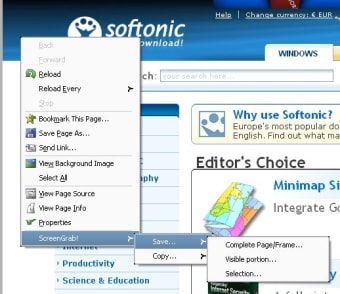
The Screengrab! extension makes your life as web developer much easier by letting you make screenshots of webpages from Firefox itself, without having to install third-party software. Simply right click anywhere on the webpage you want to save and click on the "Screengrab" menu. You can then choose between saving the captured image or copying it to the Clipboard.

Top Recommended Alternative

Screengrab! can capture a selected region, the visible portion of the website as seen through your browser's window or, what is more interesting, the whole webpage from top to bottom -that is, even the areas that fall beyond the browser's limits. This is probably the fastest and most convenient way to capture a complete website without having to copy different areas and then paste and manually arrange them on an image editor.

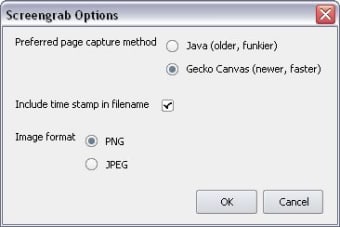
The only thing I missed in Screengrab! was the possibility to save images in more than the two formats available (JPG and PNG). Also, I found quite uncomfortable the fact that the program doesn't save the file with the appropriate extension -you have to type it yourself.


  • Pros

    • A capture tool always at reach
    • Can capture complete websites
    • Can copy data directly to Clipboard
  • Cons

    • Only supports two formats
    • Doesn't add the file extension automatically
 0/4

App specs

  • Developer

    • S3.Blog
  • License

    Free

  • Version

    0.96.3
  • Latest update

  • Platform

    Windows

  • OS

    Windows 8

  • Language

    English

  • Downloads

    47K

    Last month's downloads

    • 18
  • Size

    77.79 KB

Program available in other languages


Icon of program: ScreenGrab

ScreenGrab for PC

  • Free
  • 4.1
    57
  • 47K
  • V0.96.3
Free Download for PC

View an ad to download for free


User reviews about ScreenGrab

Have you tried ScreenGrab? Be the first to leave your opinion!

Add review

You may also like

Alternatives to ScreenGrab

Explore Apps

Latest articles

Laws concerning the use of this software vary from country to country. We do not encourage or condone the use of this program if it is in violation of these laws.
Softonic

Is ScreenGrab safe?

100/100

Score result: Clean

This file passed a comprehensive security scan using VirusTotal technology. It is safe to download.

  • Virus free
  • Spyware free
  • Malware free
  • Verified by Security Partners

    VirusTotal logo

Scan Info

Last scan
Sunday, January 7, 2024
Scan provider
VirusTotal · Full report

File Integrity

File
screengrab-0.96.3-fx.xpi
SHA256
6c992f4989661ba4d3c4e76616bf615c6a478af5d208813631b0be06b33e1d78
SHA1
a74002504f90066ff4fa3ca486071eaec207e120

Softonic security commitment

ScreenGrab has been thoroughly scanned by our advanced security systems and verified by industry-leading partners. This file comes from the official developer and has passed all our security checks, showing no signs of viruses, malware, or spyware. For more information, visit our Security and Trust Center

Signed in to Softonic as